A Smarter Way to Scrape the Web

Scrapling – The Adaptive Python Web Scraping Framework

Scrapling brings fast HTTP requests, adaptive parsing, browser automation and scalable crawling into one Python framework — helping you extract web data with less setup and maintenance.

From a single page to a larger crawling project, build flexible scrapers that can adapt as websites change.

  • Adaptive HTML Parsing
  • Fast and Flexible Fetching
  • Stealth Browser Support
  • Concurrent Web Crawling
scrapling.py
1from scrapling.fetchers import Fetcher
2
3Fetcher.configure(adaptive=True)
4page = Fetcher.get(
5 "https://example.com")
6
7# Save element fingerprints
8items = page.css(
9 ".product", auto_save=True)
Scrapling WorkflowPython
◎AdaptiveHTML Parsing
ϟFastHTTP Fetching
◇ConcurrentWeb Crawling
What Is Scrapling

What Is Scrapling?

Scrapling is an open-source Python web scraping framework designed to simplify how developers collect and process information from websites.

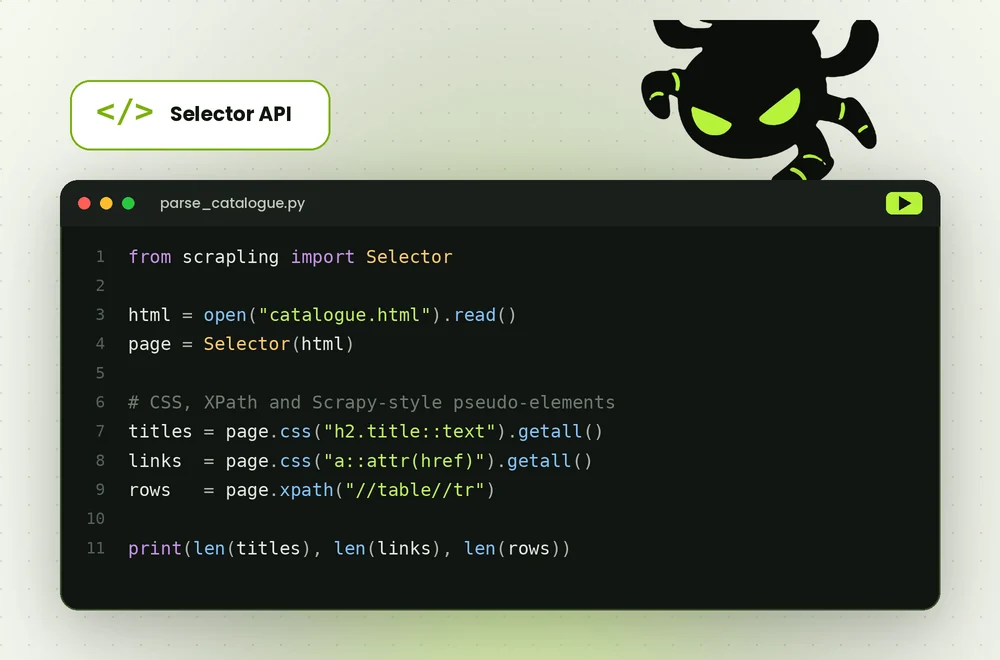
Scrapling Selector API example parsing titles, links and table rows from an HTML page

It combines the essential parts of web scraping within one library, helping developers handle HTTP requests, interact with browser-rendered pages, extract structured content and manage crawling tasks.

One of its most useful capabilities is adaptive element tracking, which helps identify previously selected elements when a website's layout changes. Instead of relying on several disconnected tools, developers can use Scrapling to build and maintain their scraping workflows in a more organised way.

  • A unified approach to web data extraction
  • Flexible options for different website types
  • Adaptive selectors for changing page structures
  • Suitable for small scripts and larger crawling projects
Why Scrapling Matters

Built for Changing Websites

Websites rarely stay the same. A small change to a page layout can interrupt data collection, while JavaScript-heavy content and browser verification can make even straightforward scraping tasks more demanding.

Scrapling is built with these challenges in mind.

Changing Website Layouts

Reduce the time spent rediscovering elements when a website's HTML structure changes.

JavaScript-Rendered Content

Use browser-based fetching when a simple HTTP request cannot retrieve the content you need.

Complex Scraping Workflows

Keep fetching, parsing and crawling within a more consistent development environment.

Growing Data Requirements

Move beyond individual requests with tools designed for concurrent crawling.

Core Features

Python Web Scraping Features

Six essential capabilities, brought together in one framework.

Adaptive Element Tracking

Scrapling can recognise previously identified elements even when their original selectors no longer match the page, helping improve the resilience of scraping workflows.

from scrapling.fetchers import Fetcher

Fetcher.configure(adaptive=True)
page = Fetcher.get("https://example.com")

# save fingerprints, relocate later
items = page.css(".product", auto_save=True)
items = page.css(".product", adaptive=True)
High-Performance HTML Parsing

Explore and extract page content using flexible parsing tools without making every extraction task unnecessarily complicated.

Fast HTTP Requests

Retrieve website content through efficient HTTP fetching for pages that do not require a full browser environment.

Stealth Browser Automation

Work with more demanding websites using browser-based fetching approaches designed to reduce common automation detection signals.

Concurrent Crawling

Process multiple pages through crawling workflows built for projects that require broader data collection.

Flexible Data Extraction

Extract text, links, attributes and other useful information from HTML documents for further processing.

How It Works

How Scrapling Works

Scrapling follows a practical process that takes you from a website request to usable information.

  1. 1

    Choose Your Fetching Approach

    Start with an HTTP fetcher for ordinary pages, or choose browser-based fetching for websites that rely on JavaScript or require more advanced interaction.

  2. 2

    Retrieve the Website Content

    Scrapling requests the page and makes its content available for inspection and extraction.

  3. 3

    Find the Information You Need

    Use HTML selectors and parsing methods to locate relevant elements, including headings, links, descriptions and other page content.

  4. 4

    Adapt to Page Changes

    Where adaptive tracking is configured, Scrapling can help relocate elements when their selectors change following updates to the website.

  5. 5

    Process or Export Your Data

    Organise the extracted information into a format suitable for your application, research project or data pipeline.

Fetching Methods

Choose Your Fetching Method

Not every website needs the same scraping approach. Scrapling gives developers the flexibility to choose a method that suits the page they are working with.

Keep Simple Tasks Simple

For ordinary HTML pages, direct HTTP requests can retrieve content without the overhead of launching a browser.

Best suited to: Static pages, accessible public content and lightweight scraping jobs.
from scrapling.fetchers import Fetcher

page = Fetcher.get("https://quotes.toscrape.com/")
quotes = page.css(".quote .text::text").getall()
Adaptive Parsing

Less Selector Maintenance

One of the most frustrating parts of web scraping is maintaining extraction code after a website changes.

A selector that works perfectly today may fail following a design update, a new page component or a minor adjustment to the HTML structure.

Scrapling's adaptive element tracking is designed to make that process less disruptive. By using information about previously identified elements, it can help locate the same content after certain structural changes.

This does not eliminate every maintenance task, but it gives developers an additional way to build more resilient scraping projects.

Build scrapers that can better handle change.

Before the redesign auto_save=True
<div class="product">
  <h2 class="title">Desk Lamp</h2>
  <span class="price">$24</span>
</div>
Selector stops matching — adaptive=True relocates it
After the redesign adaptive=True
<article class="item-card">
  <h3 class="name">Desk Lamp</h3>
  <p class="cost">$24</p>
</article>
Who Is Scrapling For

Who Uses Scrapling?

From quick scripts to structured research, Scrapling fits the way different people collect web data.

Python Developers

Build scraping scripts and integrate extracted information into Python applications without managing an unnecessarily fragmented toolset.

Data Analysts

Collect website information for cleaning, comparison and analysis within existing data workflows.

Market Researchers

Gather publicly available information to support industry research, competitive analysis and trend monitoring.

E-commerce Teams

Monitor accessible product listings, descriptions and pricing information for market insights.

Automation Engineers

Develop repeatable information-gathering workflows that can form part of wider automation systems.

Technical Researchers

Collect web-based material for investigations, academic work and structured research projects.

Getting Started

Get Started with Scrapling

Getting started should feel straightforward, even when the project you have in mind is not.

Scrapling is distributed as a Python package, with documentation covering installation, fetching methods, parsing and more advanced crawling workflows.

  1. Install Scrapling

    Set up the package and any additional browser dependencies required for your chosen workflow.

  2. Fetch Your First Page

    Choose a suitable fetching method and retrieve content from a website.

  3. Extract Useful Information

    Identify the page elements you need and begin building your extraction logic.

  • Python 3.10+
  • BSD-3-Clause
  • Official GitHub source

Get the latest source archive from the official Scrapling GitHub repository. You can also install Scrapling using pip.

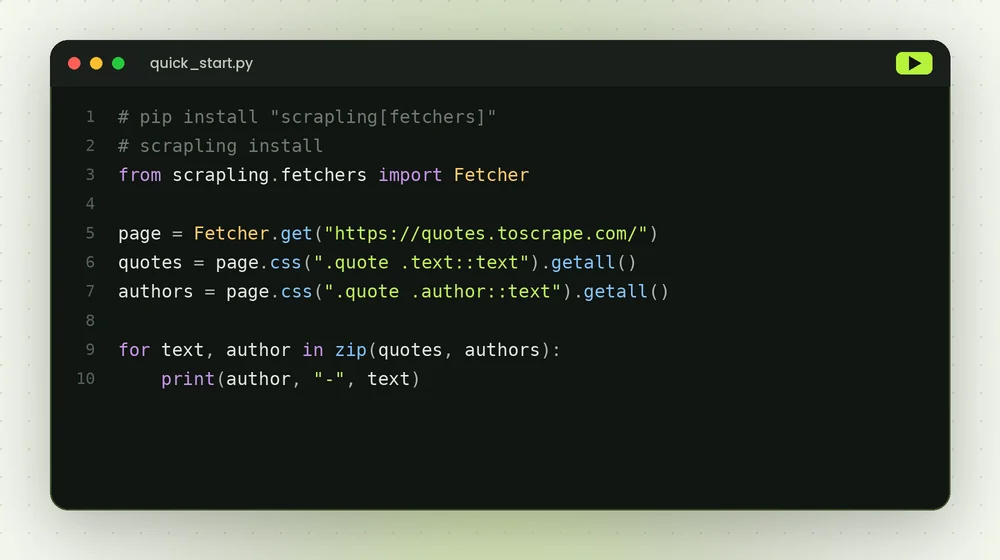
Scrapling quick start script fetching quotes.toscrape.com with Fetcher and printing authors and quotes
Real-World Applications

What You Can Build

Scrapling can support a broad range of data collection tasks. The approach you choose depends on the website, the information required and the scale of your project.

Product Information Collection

Gather accessible product names, descriptions and other listing details for organised analysis.

Website Content Monitoring

Track changes to selected pages and identify updates that matter to your project.

Public Data Research

Collect publicly accessible information for investigative, educational or analytical work.

Search Result Analysis

Process permitted search result data to support research into content visibility and discoverability.

Directory Data Extraction

Organise relevant information from publicly available directories into structured datasets.

Large-Scale Crawling Projects

Discover and process multiple connected pages through concurrent crawling workflows.

Scrapling and Traditional Scraping Tools

Why Use Scrapling?

Python developers have access to several excellent scraping tools, but projects can become harder to manage when each part of the workflow requires a separate implementation. Scrapling offers a different approach by combining fetching, parsing, adaptive tracking and crawling capabilities in one framework.

Common scraping challenges and how Scrapling approaches them
Common Scraping ChallengeScrapling's Approach
Maintaining selectors after page updatesAdaptive element tracking
Retrieving ordinary HTML pagesDirect HTTP fetching
Extracting JavaScript-rendered contentBrowser-based fetching
Working with automation detectionStealth-oriented fetching options
Crawling many pagesConcurrent crawling tools
Managing separate scraping componentsIntegrated Python framework

Scrapling is not necessarily a replacement for every specialised scraping library. Its appeal lies in bringing complementary tools together, making it easier to develop a consistent workflow as project requirements grow.

Open-Source Development

Scrapling on GitHub

Scrapling is an open-source project, giving developers the opportunity to inspect its code, follow development and contribute to its wider ecosystem.

From reporting problems to exploring new features, GitHub provides a central place to understand how the framework is evolving.

  • Explore the source code and project structure
  • Report reproducible bugs or technical issues
  • Follow releases and development updates
  • Contribute through discussions and pull requests
$ git clone https://github.com/D4Vinci/Scrapling
FAQ

Frequently Asked Questions

Quick answers about using Scrapling, installing it and connecting it to your tools.

Scrapling is used to collect and extract information from websites with Python. It supports HTTP fetching, browser automation, HTML parsing, adaptive element tracking and crawling workflows.

Scrapling is an open-source framework published on GitHub under the BSD-3-Clause licence. You should still read the licence in the official repository to understand the terms that apply to your intended use.

Yes. Scrapling provides browser-based fetching options, such as StealthyFetcher and its session classes, that can work with content rendered through JavaScript.

Beautiful Soup is primarily an HTML and XML parsing library. Scrapling combines parsing with additional capabilities such as HTTP fetching, browser automation, adaptive element tracking and crawling.

Scrapling includes stealth-oriented browser capabilities intended for challenging websites, including a solve_cloudflare option. Success against Cloudflare or any other protection system is not guaranteed and depends on the site's configuration and your permission to access it.

Developers with basic Python knowledge can begin with straightforward fetching and parsing tasks before exploring browser automation or concurrent crawling.

Scrapling offers adaptive element tracking that can help relocate previously identified elements after certain page changes. Its effectiveness depends on the particular website and how the adaptive functionality is used.

Scrapling includes concurrent crawling capabilities designed for projects that involve collecting information from multiple pages. Actual performance depends on project configuration, website behaviour and available resources.

Scrapling supports CSS selectors and XPath expressions, including Scrapy-style pseudo-elements such as ::text and ::attr(). It also offers find-style searches and the ability to find elements similar to one you already selected.

Spider results can be exported with helpers such as to_json(), to_jsonl(), to_csv() and to_xml(). For single scripts, you can write the extracted values to any format your Python project already uses.